Extended Detection and Response
Endpoint Protection
Elements Agent for Mac
WithSecure Elements Agent macOS 26.2 has been released to general availability (GA) on 5th of May 2026.
This release brings
• Updated sensor component
• Updates to the Software updater component
• Bug fixes to client side support of software inventory feature (available later in 2026)
Installer can be downloaded from
https://download.withsecure.com/PSB/latest/ElementsAgentInstaller.mpkg
Elements Agent macOS 26.2 supports following macOS versions:
• macOS 26 Tahoe
• macOS 15 Sequoia
• macOS 14 Sonoma
Elements Agent for iOS
An update to the WithSecure Elements Mobile Protection app for iOS (26.4.12194) has been released.
Fixed issues:
• Users can now temporarily pause network protection directly from the iOS Control Centre using the new widget, without navigating into the app. This makes it easier to use banking apps in Nepal that are incompatible with the VPN profile used to route traffic through Mobile Protection. Note that network protection must be paused for these banking apps to work. Protection resumes when the pause expires or is manually re-enabled.
- Fixed a crash that could occur immediately after launching the app following an update
- The "Artificial Intelligence" category is now available in Web Content Control, allowing administrators to manage access to AI services from the Elements Security Centre
Elements Agent for Linux
An update for Elements Agent for Linux (version 26.1.512) has been released. This update includes the following changes:
- Fixed an issue where activating the agent with automatic updates disabled could cause activation to time out or result in missing components.
- Installation-time connectivity check timeouts no longer cause the installation to abort; the installer will now attempt to continue and complete.
- Fixed classification of Oracle Linux 7 for installation and updates.
- Added a check during activation to verify that existing installation directories have correct permissions and do not contain symbolic links.
- Adopted a new version numbering scheme in the format YY.SEQUENCE.BUILD (e.g. 26.1.512).
- Added support for installing on Ubuntu 26.04.
Endpoint Detection and Response
Following up on our earlier updates regarding the Detection and Response Reports view, we are now moving to the final step of this transition.
What is changing next?
On Monday, June 1, the Detection and Response Reports tab will be removed from Elements and will no longer be available.
The page already includes a notification to help you prepare for this change:
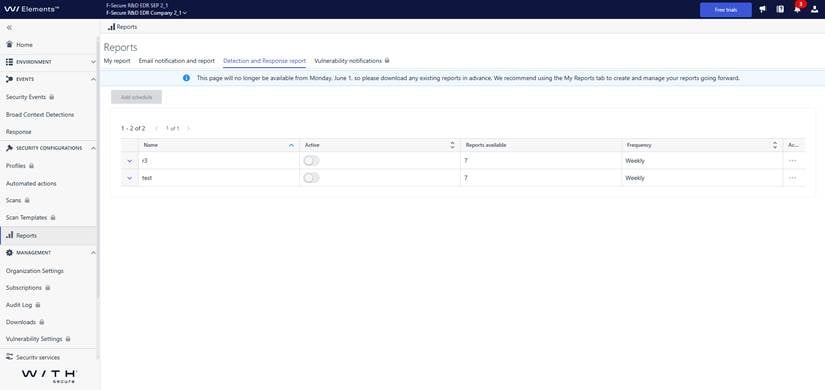
After this date:
- The Detection and Response Reports tab will no longer be accessible.
- Any reports that have not been downloaded before this date will no longer be available through this view.
What should you do now?
Please make sure to download any reports you want to keep before June 1.
We recommend using the My Reports tab to create and manage your reports going forward. It provides a more unified and up-to-date reporting experience and is now the main place for all reporting activities.
Moving to My Reports ensures you can continue working with your reports without interruption.
Thank you for your support during this transition and for helping us simplify and improve the reporting experience.
Exposure Management
Exposure Management for Business
Our latest release include updates related to Identity views, reports, XM Recommendations, XM Findings and Devices views.
Identity
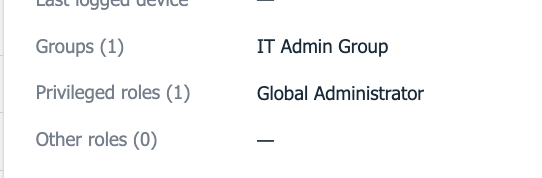
Identity Details –> Entra Group Membership
Entra group membership is now visible in the Identity details pop-up, complementing the already-available Entra roles view.
Reports
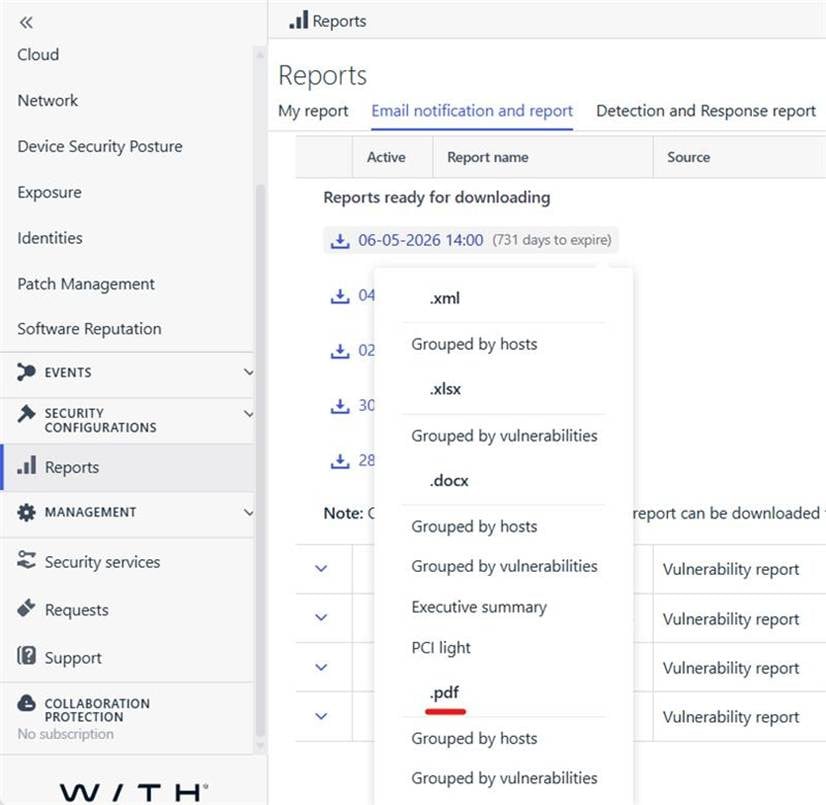
XM vulnerabilities reports are now available in pdf format
Elements Vulnerability Management Reports, accessible from Reports -> Email notification and report menu are now also downloadable in pdf format from the same context menu as before.
Note: This applies to only newly generated reports
Devices
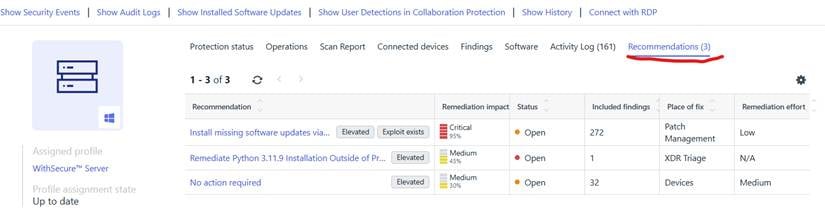
Device details page features recommendations list
The device details page Environment → Devices → (Computers & Unmanaged devices) features a new tab for showing XM recommendations only for the selected device.
Note: This tab lists only open recommendations (status category = Open)
Recommendations and Findings
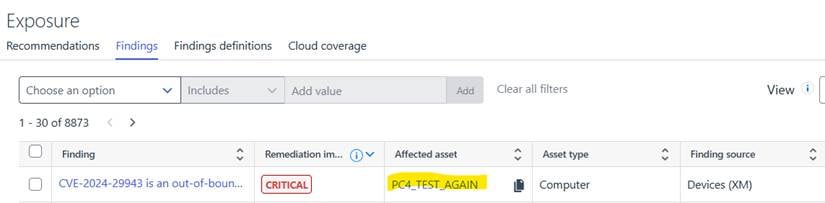
Direct navigation from Finding instances to the affected device view is now possible.
Affected asset of the Environment -> Exposure -> Findings view has a hyperlink which opens the details view of the affected asset in a new browser tab.
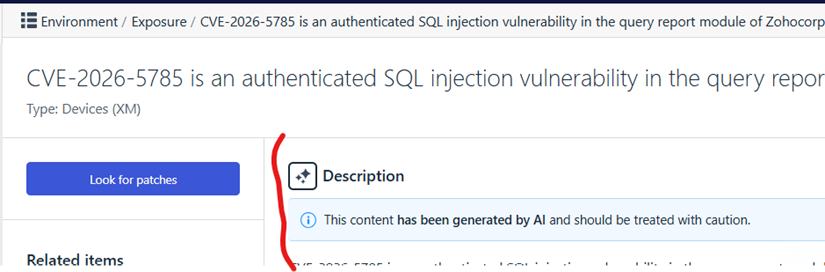
CVE-based findings being part of any Attack Paths, get an enhanced AI-generated description.
Finding details page, explicitly shows an icon to indicate whether the description is AI-generated.
Note: Not available to all CVEs, only if CVE is part of any attack paths to help with understanding the attack path step
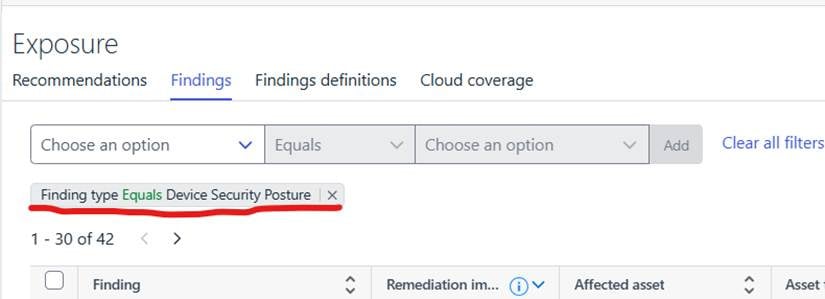
Device Security posture issues are now advised in XM as recommendations (requires EPP license).
In case an EPP subscription is already active for a company, security posture issues are already visible via Elements portal at Environment -> Device Security Posture menu. However if the company has XM subscription on top of EPP, all device security posture issues now presented also as XM recommendations. This will help with how to prioritize device security posture recommendations over all other recommendations.
Device Security Posture recommendations are visible from Environment -> Exposure -> Recommendations list view also their Findings from Environment -> Exposure -> Findings by applying filter FindingType = 'Device Security Posture'
Note: Security Posture Recommendations are only guaranteed for the newly found device posture issues which are created after the date of this release.
Vulnerability Management Portal
We have made multiple releases to the portal during May, and here are the highlights:
- Resolved an issue where the scanning mode (Passive or Active) was missing from the Network Scans list. The scanning mode is now displayed correctly for each target.
- Resolved an issue where removed unmanaged devices were still visible in legacy views and in the Summary Report wizard. Removed devices are now hidden consistently across all views.
- Resolved an issue where vulnerability counters were not recalculated after related scans had been deleted. Counters now reflect the current state correctly.
- Resolved an issue where Network Scan reports could not be opened in a new browser tab via right-click. Reports can now be opened in a new tab as expected.
- Resolved an issue where manually removing a subset of hosts from a Network Scan Group could trigger unintended removal of additional hosts in the same group. Only the selected hosts are now removed.
- Added support for SSH authentication when configuring System Scans targeting Windows devices. Previously, SSH was only available for Linux and network targets; Windows targets were limited to WinRM. With this change, users can now configure Windows-over-SSH scans, including Windows-specific options such as Windows Server Update Services (WSUS) and Windows Update settings, alongside the standard SSH options available for Linux.
- Note: This capability is currently available via API only. UI support in the System Scan wizard is coming in a future release.
- Resolved an issue where vulnerability counts on the Computers and Unmanaged Devices lists could display incorrect values.
- Resolved multiple issues in summary reports: fixed Japanese language rendering, added missing reference links (CVE identifiers), and updated product branding to WithSecure Elements Exposure Management.
- Resolved an issue where new users were not created in the system when assigned to an organization.
- Resolved an issue where navigating to a deleted or blocked unmanaged device would result in a 404 error. The device can now be viewed in an inactive state with available management options.
- Resolved an issue where removed unmanaged devices were still visible in multiple Exposure views.
- Resolved an issue where navigating from a scan definition to an unmanaged device could result in a 404 error if the device had been removed or blocked. The user is now redirected to the “Manage removed devices” view.
- Improved the error message displayed when the Scan Node Agent licence has expired.
- Overall performance and stability improvements.
Exposure Management System Scan
Support for detecting vulnerabilities in the following products was added to Authenticated Scanning for Windows:
- Acronis DeviceLock DLP
- ConnectWise Automate Agent
- Daemon Tools Lite/Pro/Ultra
- Dell Color Management Software
- Dell/Alienware Purchased Apps
- Grafana Agent Flow
- Grafana Alloy
- Intel Advanced Link Analyzer
- Intel High Level Synthesis Compiler
- Kiro CLI
- Lhaz and Lhaz+
- MongoDB Compass
- Prisma Access Agent
- Pritunl Client
- SzafirHost
- WatchGuard Authentication Gateway
- WatchGuard Endpoint Agent
- WatchGuard SSO Client
Support for detecting vulnerabilities in the following products was added to Authenticated Scanning:
- ActiveMQ Broker and ActiveMQ All
- Apache ECharts
- Apache MINA
- Apache Storm Client
- Apache Storm Metrics Prometheus
- Apache Thrift
- Spring Authorization Server
- Spring CLoud AWS SNS
- Spring Cloud Function
Elements Foundations
Elements Security Center
To prevent users from mistakenly using non-installable keys to activate Elements Agent, keys for non-installable product subscriptions are now hidden by default in the Management → Subscriptions view.
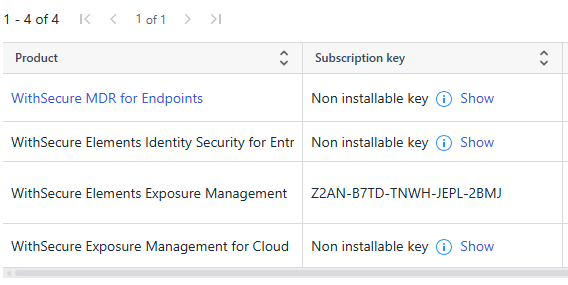
A non-installable key identifies a cloud or managed service entitlement that is not tied to a single asset or endpoint.
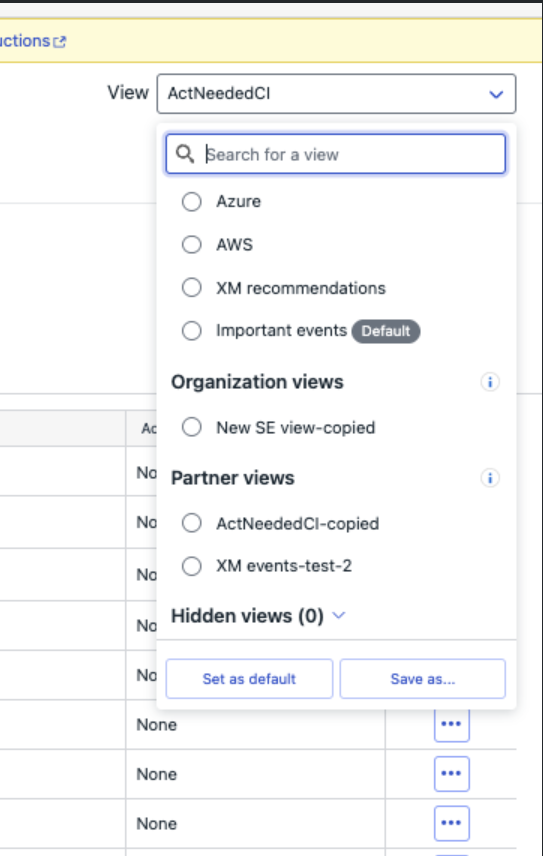
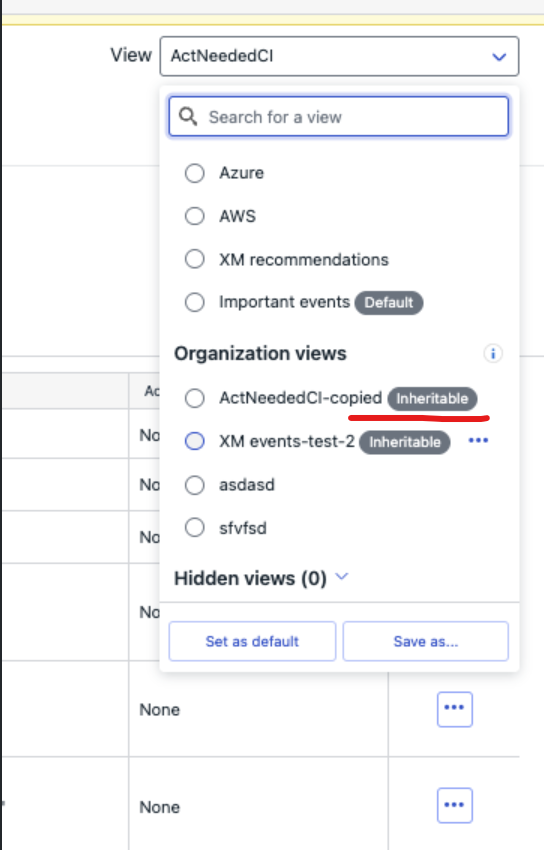
Improvements: Security Events view selector functionality has been expanded:- includes “organization views” (custom view can be copied to Org views)- includes “partner views” (Org views can become “inheritable view” and be shared to all companies of SOP)
Share your ideas with us
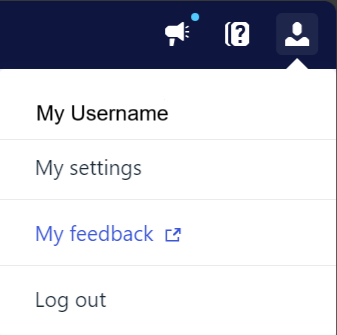
Our purpose is to co-secure the world with you – now as WithSecure™. To co-create the best possible cyber security products and services, we warmly recommend you share your ideas via the Ideas section of the WithSecure Community, now accessible directly from WithSecure™ Elements Security Center.
Further information
Changelogs and Release Notes for all parts of WithSecure™ Elements can be found at the Help Center