EDIT January 15, 2026:
Update on feature changes and known issues (January 15, 2026)
This is an update on changes to the Vulnerability assets list that was discontinued at the end of December 2025, since the changes have caused the following known issues that will be addressed shortly:
- Device Details Page for Unmanaged Devices: Links from Elements Exposure Management (XM) views to device details may lead to a page not found error (404) if the device is unmanaged. Also, linkage from Scan pages to the device details might be broken for some devices.
- UPDATE 15.1.2026: This now works for most devices, but may still happen in extremely rare cases. This is being worked on to resolve the remaining cases.
- Software List Visibility: The software list on some unmanaged devices cannot be viewed at this time.
- UPDATE 15.1.2026: This now works for most devices, but may still happen in extremely rare cases. This is being worked on to resolve the remaining cases.
- Asset Properties Editing: Importance, tags, and other asset properties previously managed by EVM are temporarily not editable until data import is completed.
- UPDATE 15.1.2026: All of the properties referred to can be edited via the Elements Security Center. However the API for editing device labels is still being worked on.
Impact
- Some device properties such as importance and business context may be not editable
- UPDATE 15.1.2026: This issue is now fixed
- Some workflows involving unmanaged devices may be disrupted.
- UPDATE 15.1.2026: This issue is now fixed
- Customers may experience broken links and limited visibility of device details.
- UPDATE 15.1.2026: Most links and device details show now be fixed. For a limited number of devices, a "Device UUID not found" message may be displayed.
Mitigation Plan
The known issues will be resolved by January 12, 2026, at the latest.
In the meantime: You can continue using the Findings and Findings Definitions views under the Environment menu in Elements as substitutes for the old Vulnerabilities views. You can also navigate from Security configurations to Scans view to see a list of vulnerabilities from a specific scan, organized by device. If you encounter issues, please reach out to our support team for assistance.
We appreciate your patience and understanding as we complete these updates to transition from EVM to the more comprehensive and intelligent solution - WithSecure Elements Exposure Management (XM).
- -
We are preparing the End of Life (EOL) of WithSecure Elements Vulnerability Management (EVM), where EVM is replaced with the more comprehensive and intelligent solution - WithSecure Elements Exposure Management (XM).
XM includes and is not limited to
- From reactive and asset centric, to proactive and estate-wide security.
- Gain visibility on what attackers would be able to do in your estate.
- Easier and more efficient prioritization of work.
- AI assistance for remediating and documenting your exposure.
- Expand your visibility beyond devices. E.g. EntraID, Azure and AWS.
As part of our efforts to provide a unified user experience across Elements, we are improving our user interface related to Elements Vulnerability Management. This operation also means decommissioning a few Vulnerability Management features that were either inconsistent or not widely adopted nowadays
We are now highlighting these changes that will impact EVM, and also when you continue using similar features in the XM product.
EVM assets management
- Vulnerability assets list page will be discontinued by the end of December 2025. From now on, EVM assets can be accessed using Devices > Computers and Devices > Unmanaged pages as communicated earlier and by selecting “Vulnerability management” from the View drop down .
- API for EVM assets management will become read-only for all properties that can be managed using Devices pages. This includes fields like alias, importance and note/business context.
- Although EVM API for assets will still work in read-only mode, we encourage to migrate any integrations to use the Elements API.
- Environment / Devices / Device Discovery will be decommissioned as the functionality is already available in the Computers view
EVM user management
- The old user interface for managing EVM users, groups and roles will be discontinued by the end of December 2025 and Elements-wide “Security groups” feature will fully replace it in early 2026.
- EVM User management API is expected to be decommissioned
- Access management can be carried out using the Elements-wide Organization settings > Security administrator page.
EVM Dashboard
- The most used widgets are available at Reports / My Report (Circle and Gauge widgets are not going to be back ported due to miniscule usage)
- Existing EVM Dashboard page will be discontinued by the end of December 2025.
- All custom VM dashboards need to be re-created by the customer. Should you need any assistance, please log a support case with us.
EVM Summary reports
- All EVM Summary reports are available on Reports / Email notifications and reports page. New reports can also be configured there, and the old page will be discontinued by the end of December 2025.
- There will be no changes to reports-related part of EVM API.
- Although there is no decommission regarding EVM summary reports, they are considered legacy and we plan to extend only XM reporting capabilities.
EVM Vulnerabilities
- Exposure > Findings and Exposure Findings definitions pages are addressing the same needs as Vulnerabilities and Vulnerability coverage pages do in EVM, but the new views contain more data and of higher quality. Hence, Vulnerabilities and Vulnerability coverage pages became redundant and will be disabled soon.
- There will be no changes to vulnerabilities-related part of EVM API.
- Recommendation is to switch to Findings and Findings definitions views under Environment mega menu in Elements as a substitute for Vulnerabilities and Vulnerability coverage views
EVM Internet Discovery
- EVM Internet discovery page has undergone a visual update, but with no changes from the usability perspective.
- External assets page has become a default landing page for Environment -> Network menu, whereas the Internet discovery has become a secondary tab.
EVM Ticketing
- The feature is in sunsetting phase already now, meaning that it’s only available for customers and partners who have already used it in the past.
- The user interface will be disabled by the end of December 2025.
- EVM ticketing API will be maintained as operational to keep the existing integrations operational as well. Meanwhile we recommend using the Elements level API for the same outcome.
Security configurations / Scans / Network scans
- All scans-related pages are undergoing a visual update.
- Compliance (PCI) column will be removed from Network scans page by the end of December 2025. The related functionality will continue to be supported.
Management / Vulnerability Settings
- The page will undergo a visual update. “General settings” and “Security settings” tabs will get merged into a single view, as part of the simplification.
- The following settings will get decommissioned from user interface:
- Contact details, as they are not in use.
- Subscriptions, which are also available in Management > Subscriptions
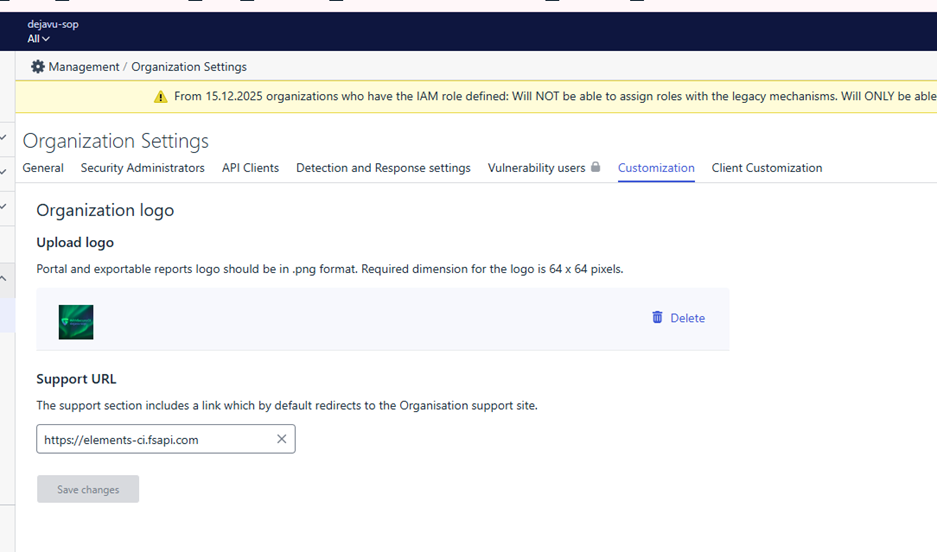
- “Customization settings”, which are also available in “MANAGEMENT > Organization Settings > Customization” with following caveats:
- Existing VM settings will not be migrated. However, they have always only applied to VM scope and have never affected other parts of Elements.
- VM reports are currently using VM settings, but will start using Elements customization settings by the end of January 2026 (RADAR-32889)
- This will no longer be supported on company-level, but only for partners.
- Vulnerability statuses and workflow, as they are on their way to be superseded by XM statuses
- Assets archiving, as this will no longer be controlled by EVM. Automated assets clean-up will be performed with “Automated deletion” feature on Devices page.
- Restrict login based on IP address will not be available any longer as we are aligning authentication & authorization throughout the Elements.
- Force two-factor authentication, as this is already forced on Elements level.
- EVM API keys definition should be done via Vulnerability settings page, as they will cease to show on Elements user profile page.