Extended Detection and Response
Endpoint Protection
WithSecure Endpoint Security Portal
Following are the improvements we have made in the Endpoint Security Portal:
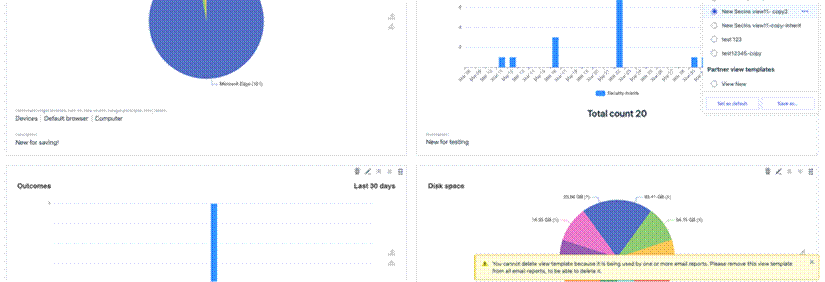
Improved user-facing message on attempt to delete view template that is used for updatable email reports.
Manage Operations screen optimized for large volumes of operations
To prevent timeouts for large partners, the Manage Operations screen now shows only the most recent 1,000 operations. If a partner has fewer than 1,000 operations, all are displayed and no flyout appears.


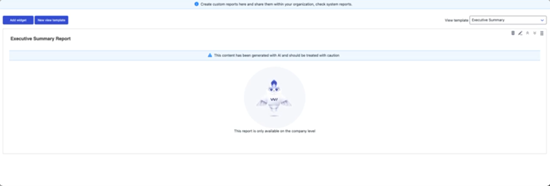
Added luminen animation to the reports
WithSecure Elements Agent for Mac
WithSecure Elements Agent macOS 26.2.55744 has been released.
This release brings
- Updated sensor component
- Updates to the Software updater component
- Bug fixes to client side support of software inventory feature (available later in 2026)
The Installer can be downloaded from
https://download.withsecure.com/PSB/latest/ElementsAgentInstaller_55744.mpkg
Elements Agent macOS 26.2.55744 supports following macOS versions:
- macOS 26 Tahoe
- macOS 15 Sequoia
- macOS 14 Sonoma
Elements Agent for Android
An update to the WithSecure Elements Mobile Protection app for Android (26.3.0023571) has been released.
Fixed issues:
- The Antivirus system scan no longer shows an incorrect "Incomplete" status
- The app now allows changing the state for recently created domains in the app UI
- The app no longer fails to apply App exceptions configured via the portal profile
Elements Agent for Windows and Server
A new version of the endpoint clients is available and existing customers have been automatically updated.
This release makes the Elements Agent version 26.2 available (internal version 26.2.301).
The endpoints automatically upgrade, without a reboot.
This release introduces new features (with Profile Editor Update).
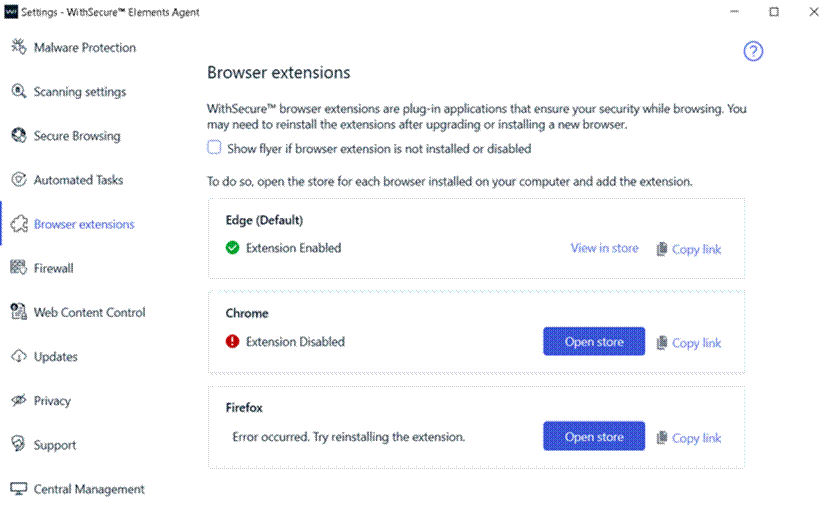
Browser Extensions Tab in Settings
A new "Browser Extensions" tab has been added to the Settings dialog. This tab shows the status of the Browsing Protection extension for each installed browser and provides options to open the browser's extension store or copy the installation link.
New Network Isolation Security Events
Two new security events have been introduced to enhance visibility into network isolation actions.
"Computer has been isolated from the network"
"Computer has been released from the network isolation"

Remote Operation to Reset Security Cloud Cache
Added a new remote operation to reset the Security Cloud cache.

Enhanced Malware Protection Status Reporting
Improved the reporting of malware protection unload status during service startup.
Endpoint Detection and Response
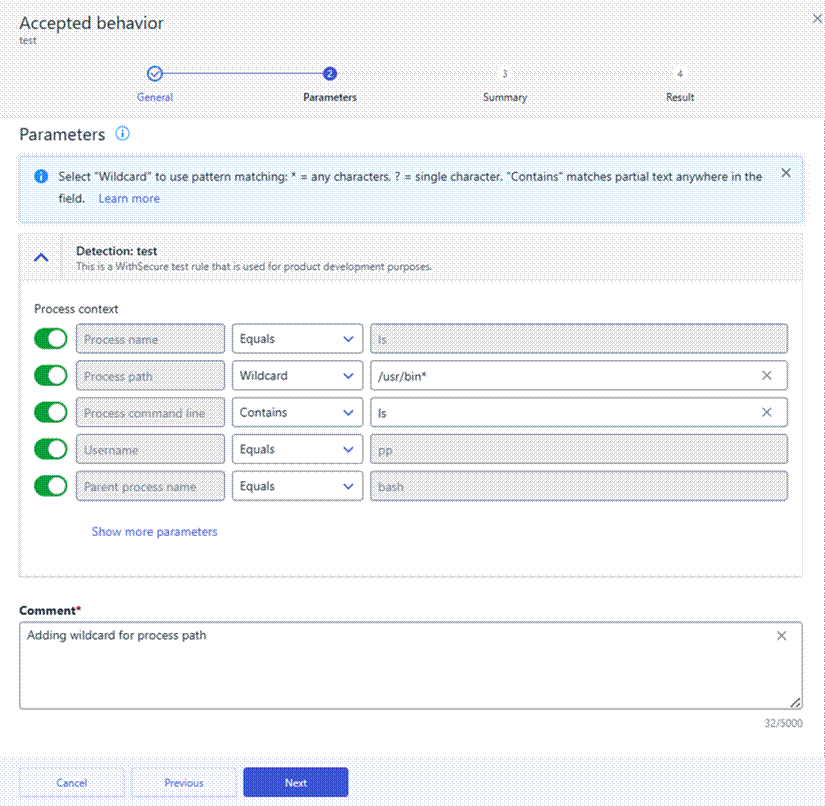
To help you create more flexible and maintainable suppression rules, wildcards are available for Accepted Behavior suppression rule parameters. Wildcards allow you to match patterns instead of exact values, making it easier to suppress recurring or similar events without creating multiple rules.
What are wildcards?
Wildcards let you define suppression rules using partial matches rather than exact strings. This is especially useful when values vary slightly, such as file names, paths, or user names.
The following wildcard characters are supported:
- * – matches any sequence of characters (including empty)
Example: *.exe matches file.exe, test.exe, .exe - ? – matches any single character
Example: file?.txt matches file1.txt, fileA.txt
To treat wildcard characters as literal values, use the backslash (\) as an escape character:
- \* – matches a literal asterisk
Example: test\*.txt matches test*.txt - \? – matches a literal question mark
Example: test\?.txt matches test?.txt
Supported parameters
Wildcards are supported in suppression rules for Accepted Behavior when matching the following parameters:
- Process name
- Process path
- Process command line
- Username
- Parent process name
- Parent process path
How to use wildcards
You can create or edit wildcard-based suppression rules in two ways:
- From Events → Broad Context Detections, when closing a detection as Accepted behavior and choosing to create a suppression rule.
- From Security Configurations → Automated actions → Suppression rules, by editing an existing rule.
In both flows, select Wildcard for the chosen parameter in the Parameters step, then define the pattern using *, ?, or escaped characters as needed.
Using wildcards helps reduce rule duplication, keeps configurations cleaner, and makes suppression rules easier to maintain over time
Exposure Management
Exposure Management Portal
Changes to the Exposure Management portal include:
- When a computer or umanaged device is restored, related findings are also restored in Exposure Management views.
- Resolved an issue with updating SSH authentication method in System Scans.
- Resolved an issue with updating TCP Scan Technique in System Scans.
- Resolved an Issue where Summary Reports failed to generate, preventing successful report creation.
- Improved Network scan tag filtering by allowing search by tag name.
- Resolved an issue on Network scans page, preventing opening device link in a new window.
- Resolved an issue where changing an Agent scan schedule could unintentionally re‑enable VM scanning that had been explicitly disabled by the user.
- Resolved an issue where new scan reports could cause findings to appear for devices that were already removed but still visible in Removed devices view.
- When the user’s name or surname is empty, the email address is displayed in multiple views.
- Resolved an issue preventing the removal of the last encryption key from the list.
- Resolved an issue where users without complete name information were displayed incorrectly. The email address is now shown when first name or last name is missing.
- Resolved an issue affecting the display of historical Web Scan reports. The report now renders correctly.
- Resolved an issue where users created in VM from ASC notifications were not properly reflected in FACS. User synchronization between systems has been fixed.
- Overall performance improvements.
- Overall security improvements.
Exposure Management System Scan
Support for detecting vulnerabilities in the following products was added to Authenticated Scanning for Windows:
- Amazon Athena ODBC Driver
- Arcserve UDP Console
- Dell PowerProtect Agent Service
- Devolutions Gateway
- ESET Protect
- HCL Traveler
- HP Device Manager
- IDrive for Windows
- Lenovo Diagnostics
- Lenovo Software Fix
- Malwarebytes Anti-Malware
- Podman Desktop
- Sentinel LDK
- TrueConf client
- Voidtools Everything
Support for detecting vulnerabilities in the following products was added to Authenticated Scanning:
- Elastic OTel Java
- pac4j-jwt
- Spring AI
Additionally, we added detection for vulnerable Axios library versions and support for detecting CVE-2026-40175 vulnerability. See this article for more information.
Exposure Management for Cloud
Improvements to Exposure Management for Cloud include:
- Fixed bug with first scans not being scheduled to run for certain accounts
- Performance and stability improvements
- New AWS rules:
- Amazon Bedrock lacks account-level guardrails
- Amazon Bedrock lacks organization-level enforced guardrails
- Amazon Bedrock agent does not have a guardrail configured
Elements Foundations
Elements Security Center
Enhanced “My Reports”
We are excited to introduce new enhancements to My Reports for MSP environments, designed to improve report management, consistency, and flexibility across organizational hierarchies.
Following are the new features
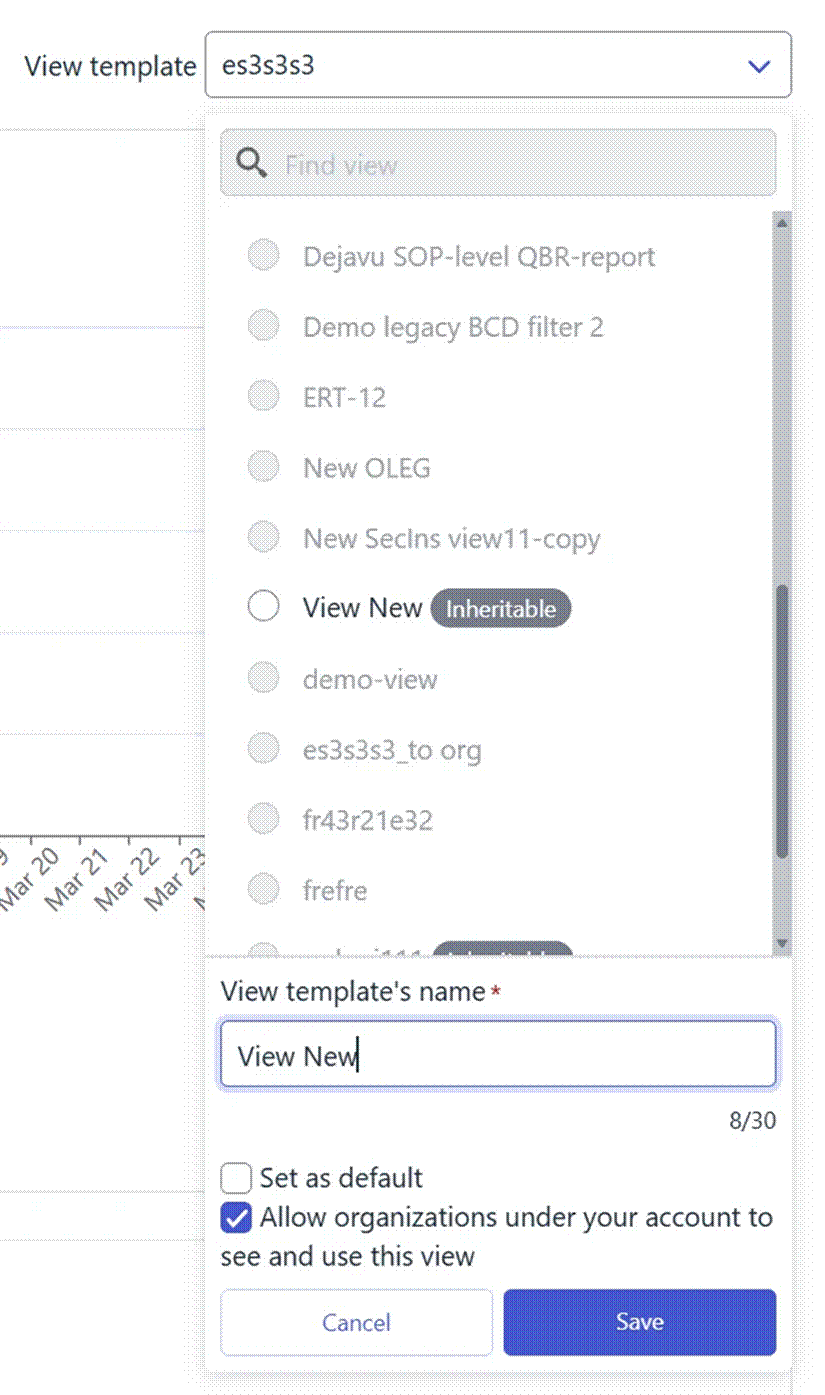
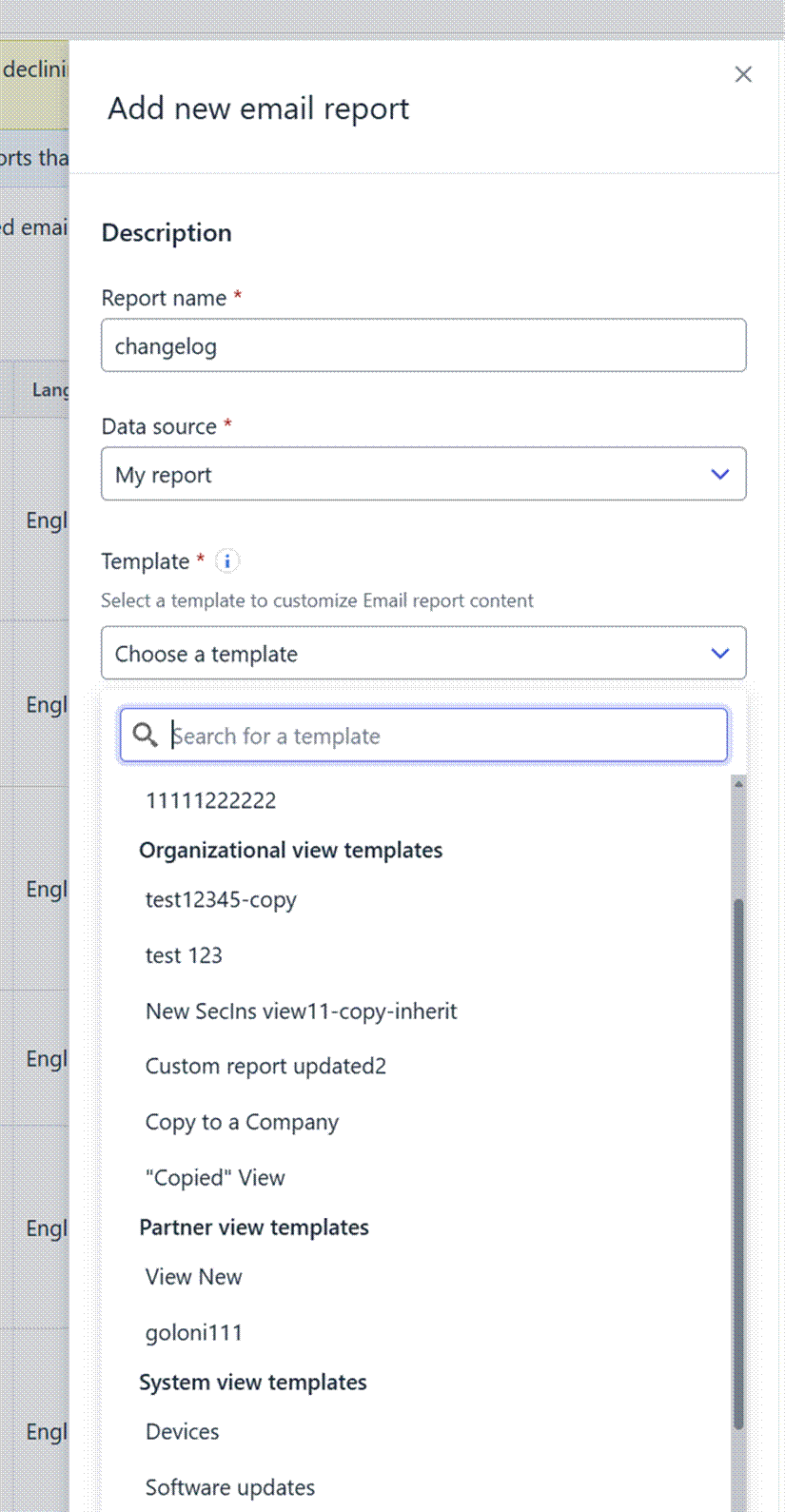
Inheritable View TemplatesSOP administrators can now mark “My report” view templates as inheritable.
This means that:
- The template becomes visible to all underlying companies in the hierarchy
- Companies can use these templates to create reports within their own scope
Updatable Reports
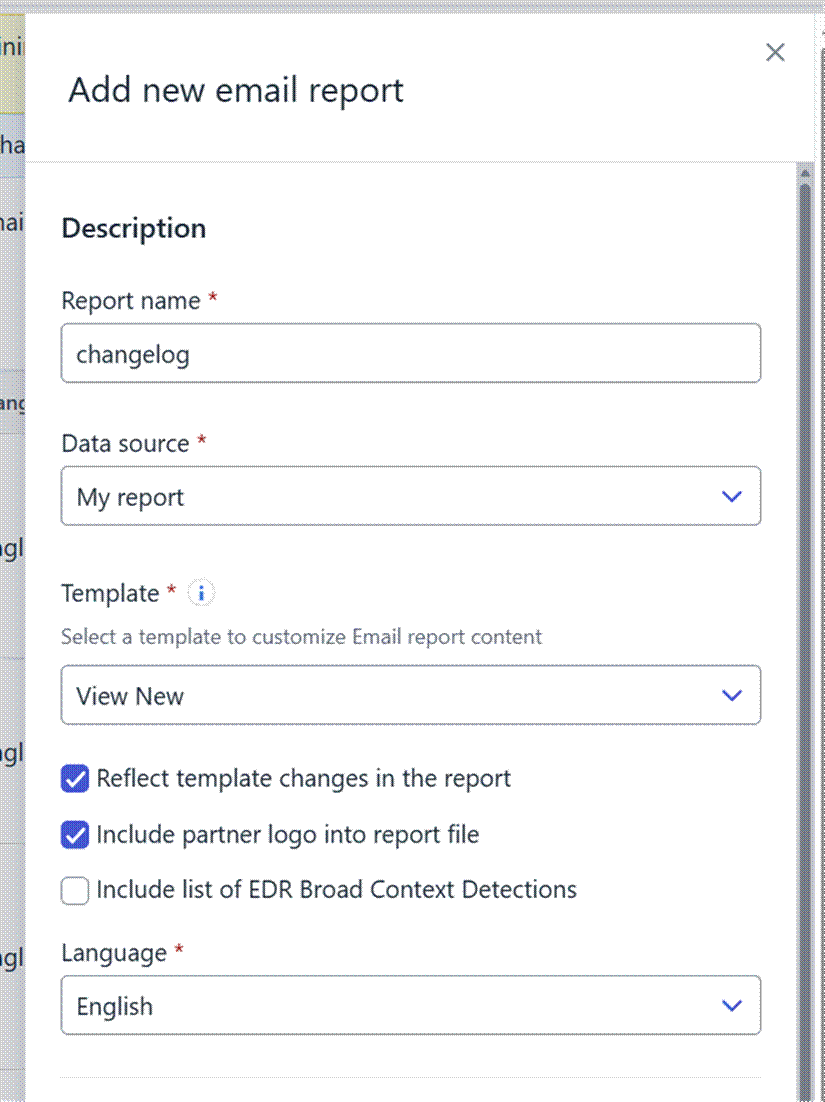
Administrators can now create updatable reports that are linked to a view template.
Key benefits:
- Reports automatically reflect any updates made to the associated template
- Ensures reports stay aligned with the latest structure and data requirements
- Reduces manual updates and maintenance
Important notes:
- This feature works only with organization-level or inherited view templates
- For inherited templates, it is now possible to include a partner logo in the generated PDF reports
Limitations:
- Previously created reports cannot be converted into updatable reports
- Once a report is created as updatable, it cannot be reverted to a non-updatable report
Integrations
Commercial API
Updated Documentation: all '/subscriptions' endpoints combined to a single List Subscriptions endpoint with filter parameters
We’ve updated the documentation presentation for the following Commercial API endpoints to align with OpenAPI 3 specification requirements:
- Get subscription by buyer assigned account id
- Get subscription by reseller account id
Both endpoints share the same base URL but differ only by query parameters.
To comply with OpenAPI 3 YAML standards, they are now documented as a single endpoint: List Subscriptions.What changed:
- The above endpoints are now combined under List Subscriptions in the documentation
- Query parameters (buyer_assigned_account_id, reseller_account_id) are available as filters within the same endpoint
- Documentation structure updated to meet OpenAPI 3 requirements and improve compatibility with API tools
What did NOT change:
- No changes to endpoint logic or behavior
- No changes to request/response formats
- Existing integrations using:
- GET /subscriptions?buyer_assigned_account_id={buyer_assigned_account_id}
- GET /subscriptions?reseller_account_id={reseller_account_id}
continue to work exactly as before
This update is documentation-only and ensures consistent representation of the API without impacting functionality.
In case you missed it
Windows ARM64: Response Actions Support Now Available
We are pleased to inform that response actions are now supported on Windows ARM64 systems.
Windows ARM64 support has already been available for the Endpoint Protection Platform (EPP) and the EDR sensor. With this update, response capabilities are extended to Windows ARM64 endpoints, completing functional parity with other supported Windows architectures for Endpoint Detection and Response (EDR).
You can find out more about this release in our dedicated article.
Changes in Exposure Management
Coming slightly later than April, but important enough to communicate here, we made some important improvements in Exposure Management during late April and early May.
You can find out more information in the Exposure Management Changelog.
Share your ideas with us
Our purpose is to co-secure the world with you – now as WithSecure™. To co-create the best possible cyber security products and services, we warmly recommend you share your ideas via the Ideas section of the WithSecure Community, now accessible directly from WithSecure™ Elements Security Center.
Further information
Changelogs and Release Notes for all parts of WithSecure™ Elements can be found at the Help Center
In case you missed it: